Game Boy Crammer · Episode 17
Noobow, Mr. Driller, Roadster & flash cards
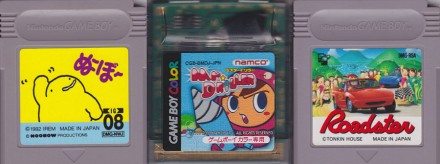
Reviews of Noobow, Mr. Driller & Roadster. Learn about flash cards & emulators.
My name is Ray Larabie, and I'm talking to you from Nagoya, Japan. Welcome to episode 17 of Game Boy Crammer. Today I'll be reviewing Noobow, Mr. Driller, Roadster, and we're going to learn a little bit about flashcards and emulators.
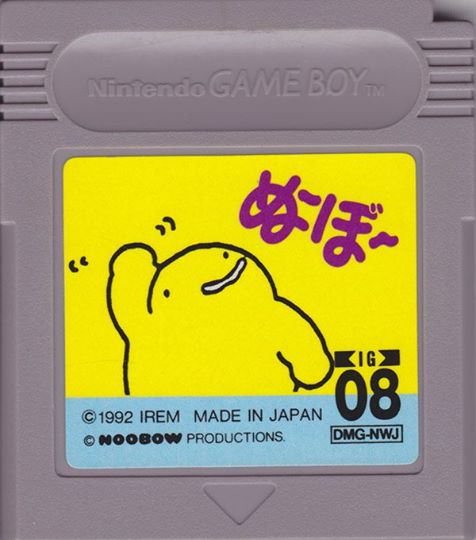
Let's start the show! Let's do a game review! Oh yeah, Noobow! You know, one of the great things about living in Japan is sometimes you get these games that are kind of hard to find, and you find them for a bargain price. I got Noobow for ten bucks. Um, Noobow is, uh, it was never released in English. Noobow is a fat little yellow character, uh, a really simple outline.
And he was a mascot for snacks that was kind of, um, I guess kind of like an arrow bar, like a puffy sponge chocolate little donut rings, I guess you could call them. I don't know, kind of a, kind of a candy chocolate by Morinaga. And uh, I started reading about the history of it, it was complicated, but basically, um, when I ask people about Noobow, they're like, oh, he's the snack guy, the Morinaga snack guy.
So he's basically, let's say he's a snack mascot, and he doesn't talk, at least he doesn't talk in the game. First of all, it's an Irem game, so you know it's gonna be crazy. Irem is one of those, it's like Hudson. Irem makes really interesting, strange, creative Japanese video games. And they, you know, they don't just do Game Boy games, they do arcade games as well.
And uh, so Moon Patrol, they did Moon Patrol, and R-Type, Kung Fu Master, you know, they've done games for the Saturn, and the PlayStation, and the PC. They make games very difficult, which is weird about this game, it's not difficult at all. Well, I shouldn't say it's not that difficult, but it's not a fast game.
Basically you can't die in Noobow. And the idea of Noobow is, it's a puzzle game. It's a platform puzzler. You start off on a little island, and there's a boat, you jump on the boat, and you go to another island, and you figure out how to pile up blocks to get up on a platform. Really simple, little, fun puzzles.
And there are more elements introduced as you go along, you can, I don't want to ruin the game for you, but you can pick up sticks, and buckets, and there's a funny hat that you use as a hang glider, or a parachute. And every level you play, there's some kind of new, interesting element. There's the, like, fans that blow you upward.
All kinds of stuff. There's a lot of surprises everywhere. Now, there's no battery in this game, um, there's no save game, so you, but you get this weird password system where you get creatures instead of password characters, numbers and letters. When I write down what level I am in my notebook, I have to write, I have to actually draw pictures of little animals.
That makes it kind of fun. I got this little notebook with level, level passwords that look like, uh, little creatures. Nuvo is really wonderful. You will not regret having Nuvo. And it's one of those long-term games because there's kind of a branching system near the beginning where you get to choose from four different levels, so I don't even know how many levels are in this game.
It's one of those ones I'm going to take my time and enjoy. I don't want to blast through this game because each level is something completely crazy and fun. And I've had a couple where I got stuck for like 40 minutes trying to figure it out. I highly recommend on the Game Boy, using the Game Boy Color, because sometimes there's a thing on the screen that you can move and you're not sure which one it is.
Well, in the Game Boy Color, it kind of cheats for you because sometimes that object is highlighted in a different color. So it gives you a little advantage figuring out the puzzles. Eh, maybe it's cheating. I don't know. Play it on black and white if you're really worried about it. But even if you can see those objects, it's still pretty hard sometimes.
I've gotten really, really stuck and I think it's the kind of game that anybody can play. Like I said, there's no rush. There's no time limit on the levels and then you can't die. So just take your time and fool around and get through the levels. Write down your password code and the music is great. Listen to that.
It's just so adorable. I just wish there were more games like New Bow and this is one of those ones that there should have been a full New Bow franchise. They should be full 3D PS3 New Bow shooters, right? It's a little hard to find. It's even hard to search for because the Japanese name is New Bow but it's N-O-O-B-O-W if you actually search for the Romaji, the English name.
So search for a cartridge DMG-NWJ and you'll find out all kinds of information about New Bow. You can find it. I haven't seen a lot of them around. I've seen a couple and they always seem to be in the $10, $12 range so they're not as cheap. Definitely not common. It's certainly worth picking up if you can find one.
Let's do a game review. Mr. Driller by Namco came out in the year 2000 in Japan, the U.S. and Europe. In Europe it was published by Virgin Interactive. It was released on Game Boy Color so you can't play this on an older Game Boy or on the Super Game Boy. And this game does have a battery which you'll have to replace.
It's a block puzzler but it's not like your typical block puzzler where the blocks are falling from the top of the screen. In this one it's quite the opposite. You have to drill down into blocks. So it's a cross between Dig Dug and Tetris. Your goal is to drill down to a certain level, depending on the game mode you're playing.
As you're drilling, things are falling on you. You know, you can kind of tunnel under things and things will fall and crush you. So you've got to be very careful and very fast. Your air supply is constantly running out. However, you can replenish your air supply with air canisters which are also worth a bunch of points.
Like a lot of these block puzzle games, you want to try to get the big combos of blocks. So if any blocks are touching, they kind of join together as one large block. But if a piece bigger than four hits another piece of the same color, it's instantly destroyed. So you get a lot of chain reaction kind of events where things are just collapsing all around you.
It's very frantic. Even though every time you play, it's the same play field, there's so many different variations of what you can do and so many different risks you can take. Apart from the colored blocks, there's also these X blocks. Kind of a harder material that's harder to drill. And when you drill it, it takes 20% of your oxygen supply.
So you've got to only drill those if it's absolutely necessary. And you'll find in the later levels, they've kind of hidden the air canisters around these blocks. So you have to use a little strategy to figure out how to expose the air canisters without having to drill through the blocks. Because if you have to drill through the blocks, the X blocks, it's not worth getting the canister maybe because you're using 20% every time.
And once in a while, while you're drilling, you'll find this kind of random alien hanging around which gives you tons of points. The graphics are really good. It looks like a Game Boy Advance kind of game, I think. They took the graphics from the PlayStation and Dreamcast versions of this game and kind of punched up the contrast quite a bit.
If you compare, if you look online at pictures of the Dreamcast or PlayStation versions, you can see it's a little more pastel, a little more subtle. I guess to compensate for the Game Boy Color screen, they really pumped up the contrast. You can always see where you're going, see what you're doing. This is one of these games you can use to kind of show off your Game Boy Color.
You know, if someone thinks, oh, it's kind of binky and maybe I've seen Alleyway or Super Mario on an old Game Boy, well, you show them this and it's like, wow, this is really Game Boy Color. I read some old reviews and at the time, people were really disappointed with the graphics in this. But I think when you look back at it now, it just looks so great.
Everything's so crisp. The scrolling is really smooth. It just feels like a really polished, well-done game. The one problem I'd say with Mr. Driller is it was not a variety of gameplay. You know, you have your 500-meter goal, you have a 1,000-meter goal. There's a few game modes, but it's just not that much to keep you super enthralled.
It's kind of a pick-it-up-and-play-it-once-in-a-while game, but it's very simple and the great thing about this game is anybody can play it. The game mechanics are not complicated, basically one button to press and very obvious what you're supposed to do. And this is a points game, really, because after the first few times you play it, you can get to the goal without too much hassle if you learn how to not get killed so much.
And then it's a matter of just trying to beat your high score. As I said, this thing has a battery that saves your high score, so you're constantly trying to top your score. And comparing it to the PlayStation Dreamcast versions seems to be exactly the same. I don't really see a big difference. The music is okay.
It's very Namco. I would say this is a really good one to have in your collection. If you can find it for not too high a price, I would get it. There's no reason not to get the Japanese version. There's a little bit of storyline at the beginning, but it's a puzzle game, so. I recommend getting whatever version of Mr. Driller is the lowest price.
Look for cgb-bdme for the U.S. version, cgb-bmdj for the Japanese version, and cgb-bmdp for the European version. Roadster by Tonkin House, 1990. Some of you Game Boy collectors may have your Roadsters card out saying, oh, I know this game, Roadsters. No, no, no, no. Roadster, not Roadsters. Roadsters was a Game Boy Color game that came up from Titus Software later.
This is a Japan-only game that came out in 1990s. It's a very early Game Boy game. Now, Roadster in Japan is a Mazda Miata. This is the top-down 2D racer in the style of Micro Machines or Katobi Road, where the landscape doesn't rotate. You're just, your car rotates. The whole game is all Roadsters. Every car looks the same and handles pretty much the same.
When you start the game, you have a choice of different competitors. Each competitor has a car with slightly different stats. Now, these stats are not very complicated. There's body and tire. Body is kind of like armor and tire is your tire wear, and those tires wear up very fast in this game, so you want to pick something with good tires.
If you drive carefully, you don't need the body level to be that high. It's kind of an unorthodox control system, unlike most games. This one, you hold down A for your low gear acceleration. So when you start, you're holding A, and then once you get up to speed, you don't really know when, you just feel it, then you switch over to B. So you're going to hold A, then hold B. So most of the time in this game, you're holding B until you need to speed up from slow again and hold A. And a very strange thing happens once in a while where your engine will just kind of slow down.
It's like, I didn't hit anything. Are we going uphill? And you have to kind of shift down. Now you're playing against a lot of competitors. You can play 5, 10, 15, or 20 laps, which is a long, long game, 20 laps. These competitors, with their identical cars, it's very unfair because you just touch them and they send you spinning, causing body damage, and it doesn't seem like you can affect them in any way.
You can't really send them out of control or damage them, so it's just you getting hurt. You don't want to touch anything in this game. You can't, you know, like micro machines, you can't really see very far ahead. It's very much like driving in fog. Luckily, there's some big arrows on the road. Your car is always in the center of the screen, which is kind of nice because some of these games like Atobi Road, your car is always at the bottom.
So when you're coming down the screen, you can see even less ahead of your car. However, I do prefer when these type of games will kind of shift the car around depending what direction you're going to give you a little more visibility. Your car is pretty big on the screen, so you really don't have time to react.
There are power-ups, which are almost impossible to get. You just have to be lucky because they come up so quickly. These power-ups fix your body, fix your tires, make you invulnerable for a few seconds, so you can actually drive through the other cars for a few seconds. There is oil. There's sort of a boost power-up that makes you go fast, and there's pit stops, so you can, you know, if your tires are really worn out, and some of the harder tracks are really hard to finish when you're driving on the rims, so you want to stop in the pit stop.
It's pretty quick. It doesn't slow you down too much. You can probably catch up. It seems like the AI on these cars is just to move slightly faster or slower. You can actually see the random accelerator thing going on, so there's not much in the way of AI. They always seem to drive right in your face.
It's just not very satisfying or fun. It's a little more frustrating. The car doesn't have a nice, you know, if the car had a nice feel to it, this probably would be okay, but it just doesn't have a very realistic feel. You know, the sliding and drifting feels very fake. The AI is just not that interesting.
Like, there's not much going on as far as the other cars. They may as well. They're just kind of obstacles. If you crash your car really hard, if you slam into a wall, you have to run back to your car. So you're actually hoofing it back to your car, getting in and driving. So everyone's gone by that point.
I would say if you are a collector of racing games on the Game Boy, you probably want to get this game. Or if you're crazy about the Mazda Miata, this is the game for you. I got it for about 10 bucks, so it's not super expensive. So that's it. Roadster from Tonkin House. If you're looking this thing up, look up DMG-RSA.
I'm sure everyone's seen the Virtual Console on the Wii U and the Wii and the 3DS. Basically it emulates an original Game Boy, and you can play original Game Boy games for pretty cheap. You probably know there are emulators that you can get for your computer, where you can download ROMs and play these things.
Look, I'm not the Game Boy police, so I'm not going to tell you what to do. You probably run one of these emulators on a computer, or maybe on your phone, or a tablet. There are also these devices you can buy that are literally made for emulation. I picked one up a couple years ago called the Dingoo.
Unfortunately I picked a model that was newer. Most of the emulator support was for the previous model and the model after that. Mine was kind of an orphan model. But it does support Game Boy. It's okay, but the screen's actually smaller than an actual Game Boy. It's just slightly larger than the Game Boy Micro, and you know, with these things the feel just isn't right, like I just can't play anything on it.
Last year I got this thing called the Yenlips. It looks like a PSP, but a little bit scaled up. It's just got a huge, big screen on it, and it seems pretty powerful. It's Android based, and you can run all kinds of emulators on it. Actually it comes from China, and it comes with a whole bunch of emulators built in, and a bunch of ROMs on it already.
The big screen is really easy on the eyes. I can turn off all the smoothing and stuff like that, so I get this really nice, crisp Game Boy display. I wouldn't want to experience all Game Boy games that way, because well, you just can't beat that Game Boy controller. When I got this thing, the D-pad was individual buttons with their own individual movement.
It would be like taking a Super Nintendo controller, turning it upside down and trying to control the directions with the buttons. So my cousin and I, we opened this thing up and took a D-pad from a PlayStation 1, filed it down, now it's got like a real PlayStation controller in there, which still isn't as good as a Nintendo controller, but it does the trick.
But nothing beats playing these games on a real Game Boy. But what if you can't get every game that you want? Well, you know, I mean some of these games are a hundred bucks, and they're games that you can't even get. If you want to play RPGs, Japanese RPGs, and you can't read Japanese, then you probably want to get fan translations and stuff like that in homebrew games.
So you probably want to get a flash cart. Now there's two different ways you can go with a flash cart. You can get a Game Boy flash cart that'll run on a Game Boy Color and a Game Boy, or you can get a Game Boy Advance flash cart and then run emulated Game Boy games on that. The most commonly available Game Boy flash cart nowadays is the USB 64M smart card.
These things go for about 40 bucks. They come with their own battery inside for your save game. You can fit about 20 games on there, so it depends on the size of the game. There's such a big variation in the size of Game Boy games. So you're not going to put your entire collection on it, but enough to carry around with you.
You plug it into a USB cable and you have to run these special drivers to be able to load games to it. The big disadvantage of this kind of cartridge is the games are saved in SRAM. There's only one addressable area for the entire cartridge. That means all your games are sharing the one save game, which means basically you can only really have one game that allows save games on there.
I mean, you don't want to have two games and one of them saving over your save game. But really, the most practical way to use this thing is have one game that has a save game on it, and the rest of them are all games that don't have save games, games with passwords or games that just don't save. A very practical limitation.
If you're really into playing RPG games, this may not do it for you, unless you really play one at a time. But like I said, there are some RPGs that have never been translated officially into English, so this is the only way you can play these games on a Game Boy. If you want to go the Game Boy Advance route, you can pick up a Game Boy Advance Flash cartridge.
Now they're actually around the same price, they're around the $50 range. There's no limitations really for the save games, you can have 100 games on there all saving your own save games. There are various ones. Now I have one called the Easy Flash 4, which really does the trick. So there's a Game Boy emulator for the Game Boy Advance called Goomba, and what you do is you download this software, it will take your Game Boy ROM and convert it to a Game Boy Advance ROM.
That way you can have a whole bunch of Game Boy games on a cart that will allow their own respective save games, and then you can back them up on your computer too. To me that's, if you're going to play a lot of RPGs from the original Game Boy, then that is probably the most practical way to do it, especially if you want to play fan-translated ones.
I think the Goomba emulator was intended to have save states, but the current version doesn't. When I say current, it came out 9 years ago, so I don't think there's going to be any new versions. It doesn't allow save states, which to me is good in a way, because it means I won't cheat, but it does allow another kind of cheating.
If you're playing a Game Boy Color game, you can actually change the system clock, because the Game Boy Color runs at twice the CPU speed as the original Game Boy, so you can actually play a Game Boy Color game and then shift the CPU down to the half speed. So what it means is, if you're fighting a boss in Zelda, let's say, and it's too hard, you can slow time down a little bit and give yourself a little cheat.
What I like about using a Game Boy Advance in the Goomba is, if I'm going on a long trip, for example, sometimes I'll take a trip to Canada for a few days, you know, with all the airport transfers and stuff like that, it ends up being about 20, 24 hours of flying. I don't want to carry a bag full of Game Boy carts.
I have a few fan-translated games that I play that I convert to Goomba and then load on a Game Boy Advance cart and play that on a Game Boy Micro. Since the legality of these things is unclear, wait a minute, no, it's very clear, they're illegal, so it makes acquiring them a little bit difficult. I live in Japan, and when I first came here, I'd go into a retro game store and they had sort of a glass cabinet where you could find that kind of stuff.
It wasn't out on display, but you could ask for it. And then a couple years ago, they came out with this really strict law and they made an example of some people, threw a couple of guys in jail for selling flashcards. So I have to order stuff from China or the US. So just be careful and use some common sense.
Tracking down fan translations is pretty easy, but you usually have to supply your own ROM and then run a utility that'll patch the translation to that ROM. If you're not comfortable downloading a whole bunch of ROMs from a torrent, you can go to a site called The ISO Zone and not so legally download individual Game Boy ROMs.
If you're listening to this podcast and you're a cop, I think legally you have to tell me right now. I think that's how it works.